
I was always sure that ACI and NSX-T can work together, today i tested it , i connected My NSX-T lab to my ACI lab via BGP
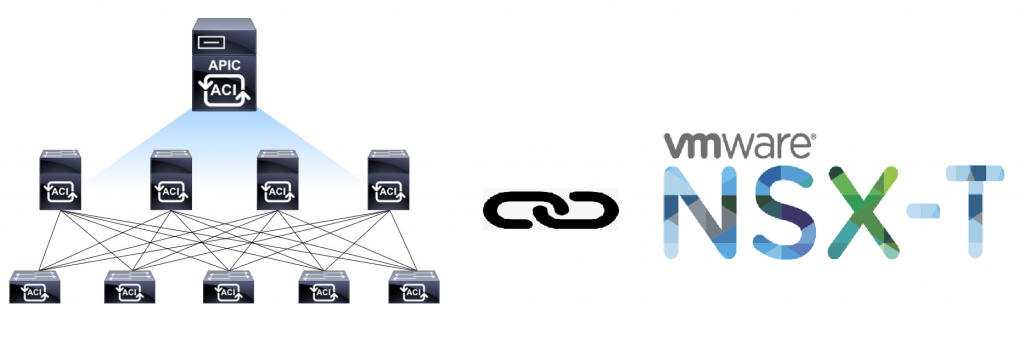
I was always sure that ACI and NSX-T can work together, today i tested it , i connected My NSX-T lab to my ACI lab via BGP
After few NSX (NSX-V) designing & deploying projects,
I installed NSX-T at my lab, it was harder then i thought 🙂
It’s very different from NSX-V.
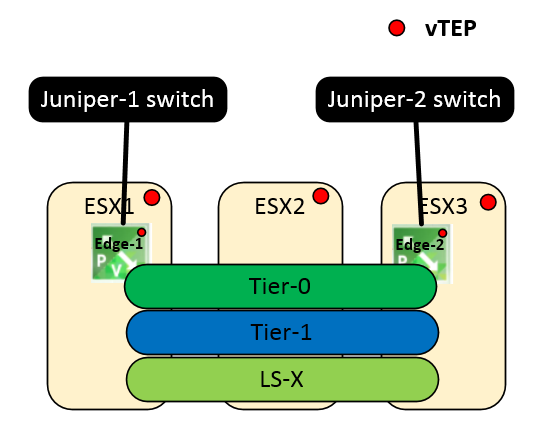
This is my NSX-T lab physical topology
These commands are for R6 & R7
——- general ———
ip interface vlan223 address 172.22.23.2 mask 255.255.255.0 admin-state enable vlan 223
ip interface vlan333 address 172.23.33.3 mask 255.255.255.0 admin enable vlan 333
vlan 13 members port 1/3 untagged
vlan 2 members port 1/4 tagged
vlan 13 port default 1/3
vlan 2 802.1q 1/4
modify running-directory working
ip route-map local-to-rip sequence-number 10 action permit
ip route-map local-to-rip sequence-number 10 match ip-address 0.0.0.0/0 redist-control all-subnets
ip redist local into rip route-map local-to-rip
First get your copy of ciscoworks 3.2 from-
Before installing
If you change it later you will have a lot of problems..
Test
(From the Server)
C:\>echo %computername%
CISCOWORKSPC

C:\>ipconfig
Windows IP Configuration

Ethernet adapter Local Area Connection:

   Connection-specific DNS Suffix  . :
   IPv4 Address. . . . . . . . . . . : 10.0.0.100
   Subnet Mask . . . . . . . . . . . : 255.255.255.0
   Default Gateway . . . . . . . . . : 10.0.0.254

C:\>ping CISCOWORKSPC

Pinging CiscoWorksPC [10.0.0.100] with 32 bytes of data:
Reply from 10.0.0.100: bytes=32 time<1ms TTL=128
Reply from 10.0.0.100: bytes=32 time<1ms TTL=128
Reply from 10.0.0.100: bytes=32 time<1ms TTL=128
Reply from 10.0.0.100: bytes=32 time<1ms TTL=128

Ping statistics for 10.0.0.100:
    Packets: Sent = 4, Received = 4, Lost = 0 (0% loss),
Approximate round trip times in milli-seconds:
    Minimum = 0ms, Maximum = 0ms, Average = 0ms
If you wants that device aliases will be saved in zone configuration as name instead of WWPN
You can use enhanced device-alias-
device-alias mode enhanced
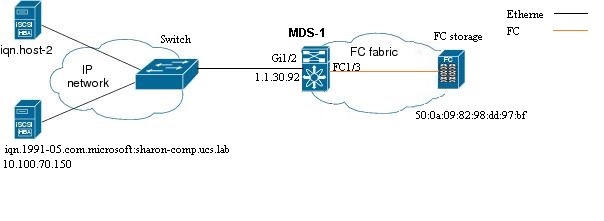
How to configure MDS switch to connect iSCSI Servers (Initaiators) to a FC storage(Target)
Topology
 Watch Full Movie Online Streaming Online and Download
Configuration
How to check why a UCS blade server can’t boot from san
UCS-LAB-A# connect adapter 1/4/1
adapter 1/4/1 #
adapter 1/4/1 # connect
adapter 1/4/1 (top):1#
adapter 1/4/1 (top):1# attach-fls
adapter 1/4/1 (fls):1#
adapter 1/4/1 (fls):1# vnic
---- ---- ---- ------- -------
vnic ecpu type state   lif
---- ---- ---- ------- -------
7    1    fc   active  4
8    2    fc   active  5
adapter 1/4/1 (fls):2#
adapter 1/4/1 (fls):2# lunlist 7
vnic : 7 lifid: 4
  - FLOGI State : flogi est (fc_id 0x910001)
  - PLOGI Sessions
     - WWNN 50:0a:09:81:88:dd:97:bf WWPN 50:0a:09:81:88:dd:97:bf fc_id 0x910003
       - LUN's configured (SCSI Type, Version, Vendor, Serial No.)
           LUN ID : 0x000a000000000000 (0x0, 0x4, NETAPP  , P4DsRoviYRlA)
       - REPORT LUNs Query Response
           LUN ID : 0x0004000000000000
           LUN ID : 0x000a000000000000
  - Nameserver Query Response
     - WWPN : 50:0a:09:81:88:dd:97:bf
An alias I made for Cisco nexus switches to show the current hierarchical configuration Rings 2017 streaming
(Works like cur in Alteon)
Exampe
SW1-1(config)#int e3/9
SW1-1(config-if)#cur
interface Ethernet3/9
switchport
switchport mode trunk
switchport trunk native vlan 70
switchport trunk allowed vlan 70,100
no shutdown
SW1-1(config-if)#vdc SW1-4
SW1-1(config-vdc)#cur
vdc SW1-4 id 4
limit-resource module-type m1 f1 m1xl
allocate interface Ethernet1/25-32
allocate interface Ethernet2/25-32
allocate interface Ethernet3/31-48
boot-order 1
limit-resource vlan minimum 16 maximum 4094
limit-resource monitor-session minimum 0 maximum 2
limit-resource monitor-session-erspan-dst minimum 0 maximum 23
limit-resource vrf minimum 2 maximum 4096
limit-resource port-channel minimum 0 maximum 768
limit-resource u4route-mem minimum 8 maximum 8
limit-resource u6route-mem minimum 4 maximum 4
limit-resource m4route-mem minimum 8 maximum 8
limit-resource m6route-mem minimum 5 maximum 5
SW1-1(config-if)#The aliascli alias name cur where detail | sed -n 2p | sed "s/^ *//" | sed "s/^/show run | sec '^/" | sed "s/$//" | vsh
It is recommended that you look at Nortel 8600 CPU utilization
While making changes in the network / Configuration
The problem is that the Graph scale allways changing and it hard to understand what is the Utilization
Example topology
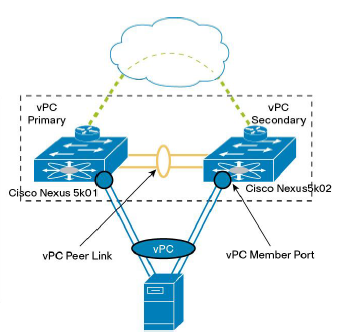
Cisco Nexus VPC – best practices
vpc domain 1
 peer-gateway
 peer-switch
 ip arp synchronize
 delay restore 120
 graceful consistency-check
 auto-recovery
 auto-recovery reload-delay 240
If configuring “peer-switch” vPC vlans priority on both switch must be the same !!!
Use the command spanning-tree vlan <vPC vlans> priority <priority> on both switches